JavaScript Modules: Import and Export Explained
❓Why modules are required
Imagine you are building a project and you write everything in a single file.
At first, it feels easy.
Just one file… everything in one place.
But as your project grows, things start changing.
Your file becomes hundreds of lines long.
Functions are mixed together — authentication, database, calculations, everything.
You try to fix a bug… and suddenly you’re scrolling endlessly, trying to find where the problem is.
This is called a code organizing problem.
🔴Code Organizing Problem
To understand the thousand lines of code in a single file is difficult, messy, and creates the a lots of problem during debugging.
For Example:-
function add(a, b){
        //Logic
}

function email(){
        //Logic
}

function auth(){
        //Logic
}

//Hundreds of lines .......
🚨Problem Caused
1) Hard to Read:- Too many function in one file makes it confusing.
2) Difficult Debugging:- If the error occurs then it is difficult to find the error.
3) Code Duplication:- Again and again use the same logic.
4) Teamwork Issues:- Multiple developer edits the same file makes it difficult to understand the changes made by the other developer.
5) Not Scalable:- If the project is large then it is difficult to manage it.
Because of this "Code Organizing Problems" the modules are introduce
❓What is module
A module is a file or unit of code that contains related functions, variables, or classes and can be imported into other files
Simply we can say that , a module is a separate file or piece of code that contains:
functions
variables
classes
👉 which you can reuse in other files.
Here the files are dependent on each other
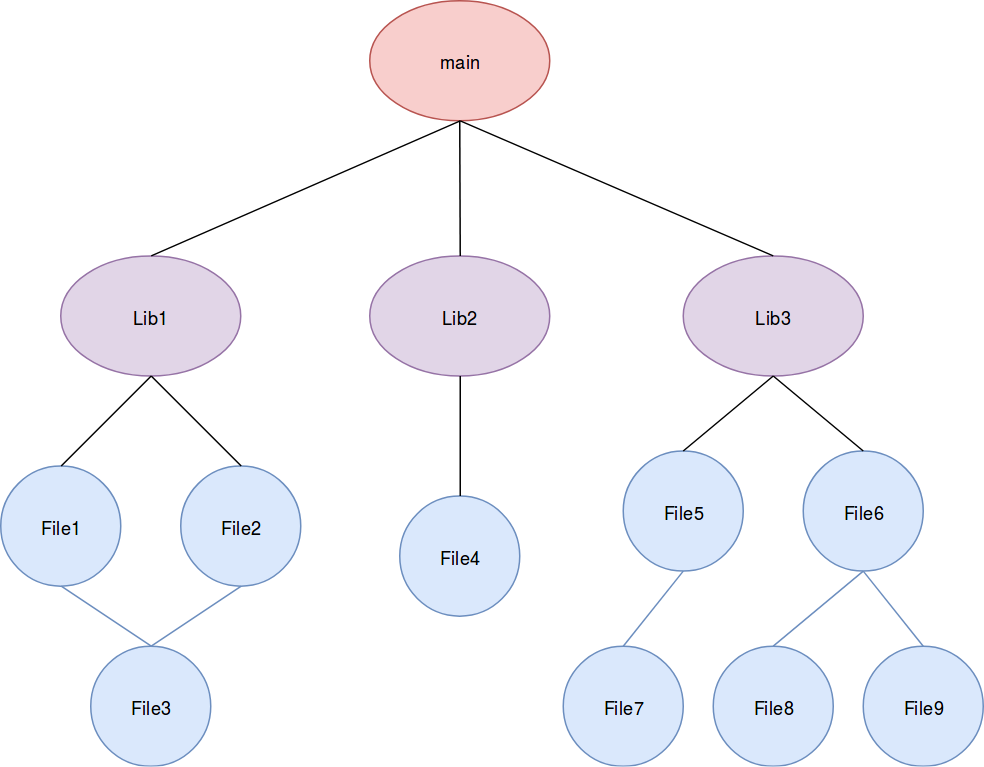
🔥Types of Modules:-
1)Default Export Modules:-
2) Named Export Modules:-
1)Default Export Modules:-
It is generally used when the file has only one main function in the given file.
No need of
{ }We can not rename the file name while importing.
📁 math.js
export default function multiply(a, b) {
   return a * b;
}
📁 app.js
import multiply from "./math.js";
console.log(multiply(5, 5);

Output:- 25
Here we write the logic of the the multiplication in the math.js file and use the logic in the another file i.e. app.js
2) Named Export Modules:-
It is generally used when the file has multiple main function in the given file.
We import the multiple files.
Must use
{ }while importing.We can rename the file during importing.
📁 math.js
export function add(a, b) {
  return a + b;
}

export function sub(a, b) {
  return a - b;
}
📁 app.js (Importing Multiple files)
import { add, sub } from "./math.js";

console.log(add(5, 3));
console.log(sub(5, 3));

Output:-
8
2
📁 app.js (Renaming the file)
import { add as sum, sub as minus } from "./math.js";

console.log(sum(5, 3));
console.log(minus(5, 3));

Output:-
8
2
/In the end, modules are not just about splitting code—they’re about writing smarter, cleaner, and more maintainable applications. As your projects grow, the difference between messy code and modular code becomes clear. If you want to build scalable and professional software, adopting modules is not a choice, it’s a necessity.